How to Set a Pokémon Card Price Alert on ChasingFoil
· Prices as of November 19, 2026
A step-by-step look at ChasingFoil price alerts: the alert types, how to pick a trigger, and a worked example using Base Set Charizard.
A ChasingFoil price alert emails you when a card crosses a price you care about, so you can stop refreshing card pages and wait for the number you actually want. This guide walks through the alert types, how to choose a trigger, and a worked example with a real card.
Why use an alert instead of checking prices yourself
Most collectors have a short list of cards they'd buy at the right price and a few they'd sell if the market jumped. Checking each one by hand every day gets old fast, and it's easy to miss a dip that only lasts a weekend. An alert does the watching for you and sends an email when your condition is met.
You'll find the feature at /price-alerts. It works on the same daily market prices you see on every card page.
The kinds of alerts you can set
ChasingFoil supports a few different triggers, and picking the right one matters more than picking the right number.
- Above a price. Good for cards you own and would consider selling if they climbed.
- Below a price. Good for cards you want to buy and have a target in mind.
- A percent drop or rise. Useful when you don't have a specific dollar target but you want to know about a sharp move.
- A 90-day low. Handy for buyers, because it tells you when a card is cheaper than it's been in about three months.
You can set these against the raw price or against the PSA 10 price, so you can watch a graded copy without tracking the raw card too.
A worked example: Base Set Charizard
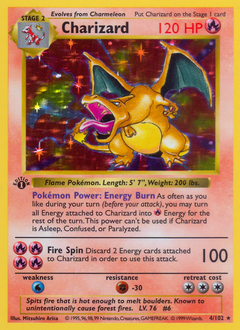
Let's use Charizard #004 from Base Set. As of November 19, 2026, its raw near-mint market price on ChasingFoil is $1,001.05. A month earlier it was around $954.65, so it's up 4.9% over 30 days.
Here's how I'd think about setting alerts on a card like this:
- If I wanted to buy: I'd set a "below" alert under the current price, or a 90-day low alert if I'm patient. A dollar target works better than a percent here because I already know what I'm willing to pay.
- If I owned a copy: I'd set an "above" alert a little over today's price, so I hear about it if the market keeps climbing.
- If I just wanted to stay informed: I'd use a percent alert so I'm only emailed when the price moves enough to matter.
Whichever you choose, open the card page first and look at the price history chart. If the card has bounced around between $950 and $1,000 for a month, an alert set a dollar away from today's price will fire constantly. If it's been steady, a tighter alert makes sense.
Setting a sensible threshold
A few habits that make alerts more useful:
- Look at the chart before you pick a number. The price history shows you what a normal swing looks like for that card.
- Use percent alerts for volatile cards and dollar alerts for steady ones.
- Don't set every alert at the exact current price. A small buffer keeps your inbox quiet.
- Check raw versus PSA 10. If you're deciding whether to grade, the gem rates page shows PSA gem rates and grading ROI, and a PSA 10 alert tells you when graded copies get cheaper or more expensive.
Price alerts are part of Pro
Price alerts are a Pro feature, and Pro includes as many as you want, which helps if you're tracking a whole set or a big binder. Pro also adds daily Buy/Hold/Sell ratings on /predictions, and you can try it free for 3 days without a credit card.
If you'd rather not sign up at all, every card page also has a free "Email me if this card drops below" box. You enter a price and your email, confirm the address, and you get one email when the card falls under your number.
Pair alerts with a binder
Alerts work best when you know what you already own. If you keep your cards in a ChasingFoil binder, you can see your total collection value daily and decide which cards are worth watching in the first place. Start with the five cards you'd most like to buy or sell and add alerts for those.
A quick checklist
- Find the card and open its page.
- Check the price history so you know what normal movement looks like.
- Decide whether you're buying, selling, or just watching.
- Pick raw or PSA 10, then pick the trigger type.
- Set the number with a little buffer and save it.
Prices mentioned here are raw near-mint market prices as of November 19, 2026, for reference only, and aren't financial advice.
Cards in this post, at today’s prices
Live raw market prices. The numbers in the post above are as of the date shown.
ChasingFoil Pro
Try everything in Pro
Pro adds daily Buy, Hold and Sell ratings, 30-day price targets, PSA 9 and PSA 10 price comparisons, and unlimited price alerts. You can try it free for 3 days, and you don’t need a credit card.
Start my free trialPrices are for reference only and aren’t financial advice. See our methodology for how they’re built.